The Memory Matrix: How a Simple Grid Exposes Student Knowledge Gaps in 120 Seconds
Key Takeaways
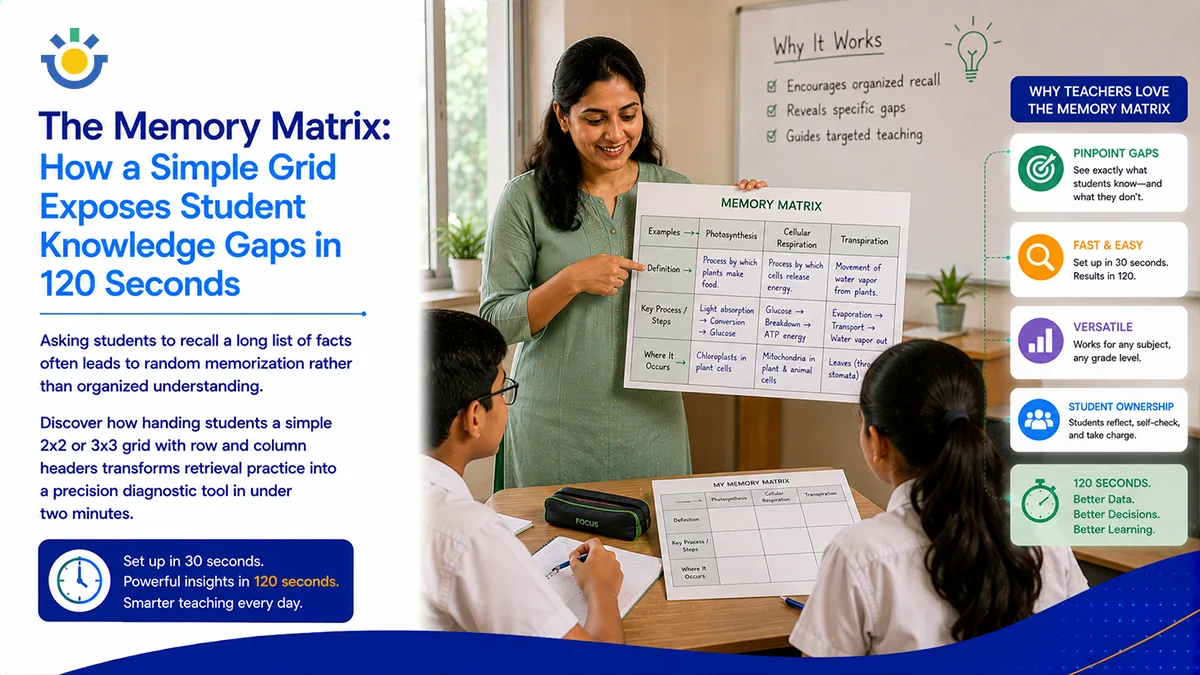
- The "Memory Matrix" is a visual retrieval strategy where students complete a 2x2 or 3x3 grid with pre-labeled row and column headers.
- Unlike unstructured brain dumps, a Memory Matrix tests spatial categorization and cross-referencing of facts, formulas, or dates.
- It isolates memory gaps instantly—blank or incorrect cells pinpoint exact conceptual weaknesses in relational knowledge.
- Completing a matrix takes 2–3 minutes, making it a low-stakes, high-yield warm-up or wrap-up activity.
- It builds automaticity in organizing complex information before students face multi-step problem-solving or essay writing.
You ask your students to list everything they remember about three historic wars, three scientific formulas, or four literary characters. Two minutes later, you look at their papers.
Some students wrote bulleted lists in no particular order. Others wrote random fragments down the margins. A few wrote nothing at all because their brains felt overwhelmed by the sheer vagueness of the prompt. On paper, it looks like a mess—and in their minds, it feels like one too.
When information lives in a student's brain as an unorganized pile of trivia, they struggle to apply it when it matters most. They might know the facts, but they don't know where those facts fit. The moment you give them a grid with strict row and column boundaries, you stop asking them to just "remember"—you ask them to organize, cross-reference, and prove they understand how ideas connect.
The Direct Answer:
A Memory Matrix is a brief classroom retrieval exercise where students fill in the empty cells of a pre-formatted 2x2 or 3x3 grid using fixed row and column headers. It tests cognitive categorization by requiring students to intersect two distinct dimensions of knowledge (e.g., Historical Era vs. Economic Impact).
The Quick-Scan Parameter:
- Time required: 2 minutes for students to fill in; 1 minute to self-check.
- Structure: 2x2 or 3x3 grid with labeled rows and columns; blank inner cells.
- Cognitive Demand: Categorization, cross-referencing, and rapid retrieval practice.
- Primary benefit: Instantly highlights specific knowledge gaps without the noise of long-form writing.
Why Unstructured Recall Fails (And Why Grids Work)
When students prepare for assessments using traditional flashcards or unstructured brain dumps, they practice isolated recall. They memorize that Point A belongs to Topic X. But exams rarely ask for isolated facts in a vacuum—they ask students to compare, contrast, and categorize.
The Memory Matrix forces two-dimensional cognitive processing:
By placing categories on the vertical axis and attributes on the horizontal axis, every empty cell becomes a specific intersection. If a cell remains blank, it isn't because the student "forgot the topic"—it’s because they lack the exact connection required for that specific intersection.
How to Run a Memory Matrix Exercise in 3 Steps
The strength of a Memory Matrix is its speed and simplicity. You don't need elaborate worksheets; a quarter-sheet of paper or a quick grid drawn on a white-board works perfectly.
1. Design a Focused Matrix
Keep the grid small. A 2x2 or 3x3 grid is the sweet spot for a 2-minute check. Ensure the row and column headers target essential comparison points.
- Science Example:
- Rows: Photosynthesis | Cellular Respiration
- Columns: Location in Cell | Primary Input | Main Output
2. Enforce the "No Notes" Rule
This is a retrieval exercise, not a copying drill. Give students 120 seconds of quiet, closed-note time to fill in as many cells as possible.
3. Rapid Self-Correction
Project the completed matrix on the board for 30 seconds immediately following the exercise. Have students use a colored pen to fill in what they missed or correct wrong intersections.
When a student sees a red mark in a single specific box (e.g., Cellular Respiration -> Location in Cell), their brain registers a precise gap to fix, rather than a vague feeling of "I don't get biology."
Scaling Retrieval Intelligence Across Your School
Scanning a set of memory matrices allows a teacher to evaluate class-wide categorization skills in under sixty seconds. But when foundational facts are routinely missed across grade levels or departments, paper grids alone cannot track the trend over time.
When students consistently struggle with relational recall, tracking these diagnostic patterns through a centralized dashboard helps instructional teams identify foundational gaps before major summative exams.
By logging these micro-checks inside a modern Learning Intelligence Operating System (LIOS), department heads and school leaders gain clear insight into memory retention trends across subjects. Teachers can align their retrieval practice, adjust review schedules, and ensure students build the organized mental structures necessary for long-term academic growth.
- Keep inner cells brief: Require single words, short dates, or compact formulas so the focus remains on rapid categorization rather than long writing.
- Mix familiar and new content: Use one row for yesterday's topic and another for a topic learned two weeks ago to encourage spaced retrieval practice.
- Use for pre-writing outline checks: Run a 2x2 matrix right before students write a comparative essay to ensure their evidence is organized before drafting.
- Scaffold for struggling learners: Provide a scrambled "word bank" at the bottom of the page that fits into the blank cells for students who need recognition support.
- Rotate header types: Alternate between cause/effect, timeline/events, and concept/example grid structures to keep the routine engaging.
Conclusion
Learning isn't just about collecting facts—it's about building a clean, accessible filing cabinet inside the brain.
By giving your students a simple grid and two minutes on the clock, you help them organize what they know, reveal what they missed, and build the mental framework needed for higher-level thinking.
Retrieval Strategy Comparison Matrix
| Strategy | Completion Time | Output Format | Primary Diagnostic Focus |
| Memory Matrix | 2 Minutes | Structured 2D Grid | Categorization & Cross-Referencing |
| Brain Dump | 2–3 Minutes | Unstructured List / Paragraph | Total Volume of Recalled Facts |
| Concept Mapping | 3–5 Minutes | Visual Network Diagram | Complex System Relationships |
| One-Sentence Summary | 2 Minutes | Single Compressed Sentence | Deep Synthesis & Logic |
Frequently Asked Questions
How can teachers track student progress without spending hours on spreadsheets?
What makes a Memory Matrix different from a standard graphic organizer?
How do instructional coaches identify learning trends across an entire department?
How do you prevent students from feeling overwhelmed by empty grid cells?
How does surfacing daily student confusion improve long-term test performance?
Can the Memory Matrix strategy be implemented digitally?
Transform Unorganized Facts into Structured Mastery
Discover how simple visual routines and real-time pulse checks can elevate retrieval practice and student retention across your entire school.
See How It Works